
OneDrive and SharePoint
One Microsoft connection covers your own OneDrive and every SharePoint site the account can open. ShowBits only reads: it imports episodes and changes or deletes nothing there. Work, school and personal Microsoft accounts can be connected.
- Who connects
- Admins of the workspace
- Who imports
- Everyone in the workspace
- Plans
- Every plan
- What ShowBits may do
- Read only: the files the connected account can open in OneDrive and SharePoint, and its SharePoint sites. ShowBits changes and deletes nothing there.
- Microsoft 365
- In many organisations, the IT approves ShowBits once
Connect OneDrive and SharePoint
Before you connect, the card says what you allow: ShowBits reads the files in OneDrive and SharePoint you have access to, to import episodes from them.
- Open Integrations.
- Under File storage, click Connect on the OneDrive / SharePoint card.
- Choose the Microsoft account: a work or school account, or a personal one.
- Microsoft lists what ShowBits asks for: read the files you can access, read your SharePoint sites, read your basic profile and keep this access. Accept it.
- Back in ShowBits, the card shows Connected and the account.
If Microsoft says that an admin has to approve ShowBits, your IT gives the approval first, as described in the next section. The connection belongs to this workspace; each workspace connects its own storage.
Approval by your IT
In many Microsoft 365 organisations, staff cannot allow an app that reads files and sites on their own. Your IT then approves ShowBits once for the whole organisation. ShowBits says so when you return from Microsoft: your IT needs to approve ShowBits for Microsoft 365 once. Personal Microsoft accounts do not need this.
- On the OneDrive / SharePoint card, click Copy next to Approval link for your IT.
- Send the link to your IT.
- Your IT opens the link and signs in with an account that may approve applications for the organisation, for example Global Administrator or Cloud Application Administrator.
- Your IT accepts. The page ShowBits is approved confirms it.
- Click Connect on the OneDrive / SharePoint card again.
The link is on the card as long as OneDrive / SharePoint is not connected. Your IT needs no ShowBits account for it. With the approval, ShowBits reads OneDrive and SharePoint always as the person who connects, and only what that person can open.
Import an episode
Once OneDrive / SharePoint is connected, everyone in the workspace can import.
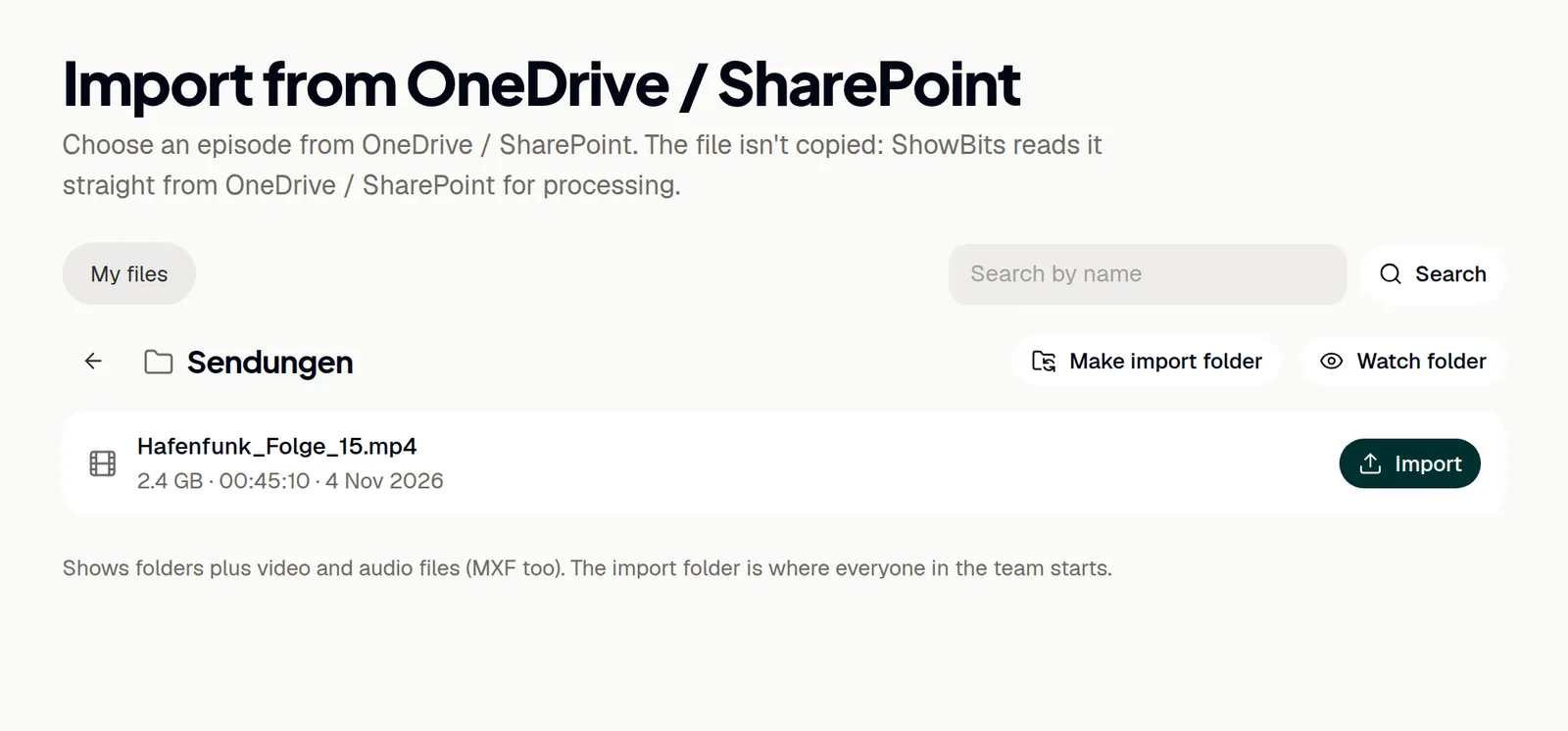
- On the Overview, click OneDrive / SharePoint next to or import from. Or click Import files on the card under Integrations.
- My files shows your own OneDrive. If an import folder is set, the page opens there.
- Open folders until you see the recording. To find it by name, type the name into the search field and click Search.
- Click Import next to the file.
- ShowBits creates the episode and starts processing it. You find it on the Overview under Processing.
Search looks through the whole OneDrive or SharePoint library you are in, not only the open folder. Files that are already episodes are marked Imported; each file can be imported once per workspace.
Import folder and watched folders
Admins can make a folder the import folder: open it on the import page and click Make import folder. Everyone in the team then starts there; Remove as import folder clears it. Admins can also watch a folder in OneDrive or SharePoint: every new video or audio file in it becomes an episode by itself, once its upload has finished. How it works: Watch folders.
Reconnect or disconnect
Admins renew or end the connection on the OneDrive / SharePoint card under Integrations. Reconnect renews it or switches to another Microsoft account. Another account clears the import folder and ends the watched folders.
- Open Integrations.
- Click Disconnect on the OneDrive / SharePoint card. ShowBits deletes its stored access right away, and the watched folders in OneDrive and SharePoint end.
- Microsoft offers no way for ShowBits to withdraw its access there. To remove ShowBits at Microsoft, use myapps.microsoft.com for a work or school account or account.live.com/consent/Manage for a personal account.
Imported episodes stay. ShowBits reads their files from OneDrive and SharePoint whenever it cuts clips, so cutting them again later needs the connection. Your IT withdraws the organisation's approval in the Microsoft Entra admin center under Enterprise applications.
Questions
Why does our IT have to approve ShowBits?
Many Microsoft 365 organisations let only admins allow apps that read files and sites. Your IT approves ShowBits once for everyone, with the Approval link for your IT from the card.
The page says “Not approved”.
The approval was not given. Your IT signs in with an account that may approve applications for your organisation, for example Global Administrator or Cloud Application Administrator, and opens the link again.
A folder that was shared with me is missing.
Add it to your OneDrive with “Add shortcut to My files”. It then appears in ShowBits under My files.
Where are the files of a team in Microsoft Teams?
In the team's SharePoint site. Open SharePoint under My files, then the site and its document library.
ShowBits says the required permission was not granted.
Microsoft did not grant all the access ShowBits needs, for example because your organisation restricts it. Ask your IT to approve ShowBits with the Approval link for your IT, then connect again.
Does ShowBits copy my files?
No. ShowBits reads the file straight from OneDrive or SharePoint, also later whenever clips of the episode are cut again. So leave the file there. Deleting the episode in ShowBits leaves the file as it is.